A handful of FHIRPath expressions come up on every real implementation, and having them at your fingertips saves the trip to the spec. The site's FHIRPath live tryout is where you can paste each one against a real resource and confirm the shape of the return. For the wider FHIR framing, more healthcare interoperability notes collects related pieces.
Get the First Item of a Collection
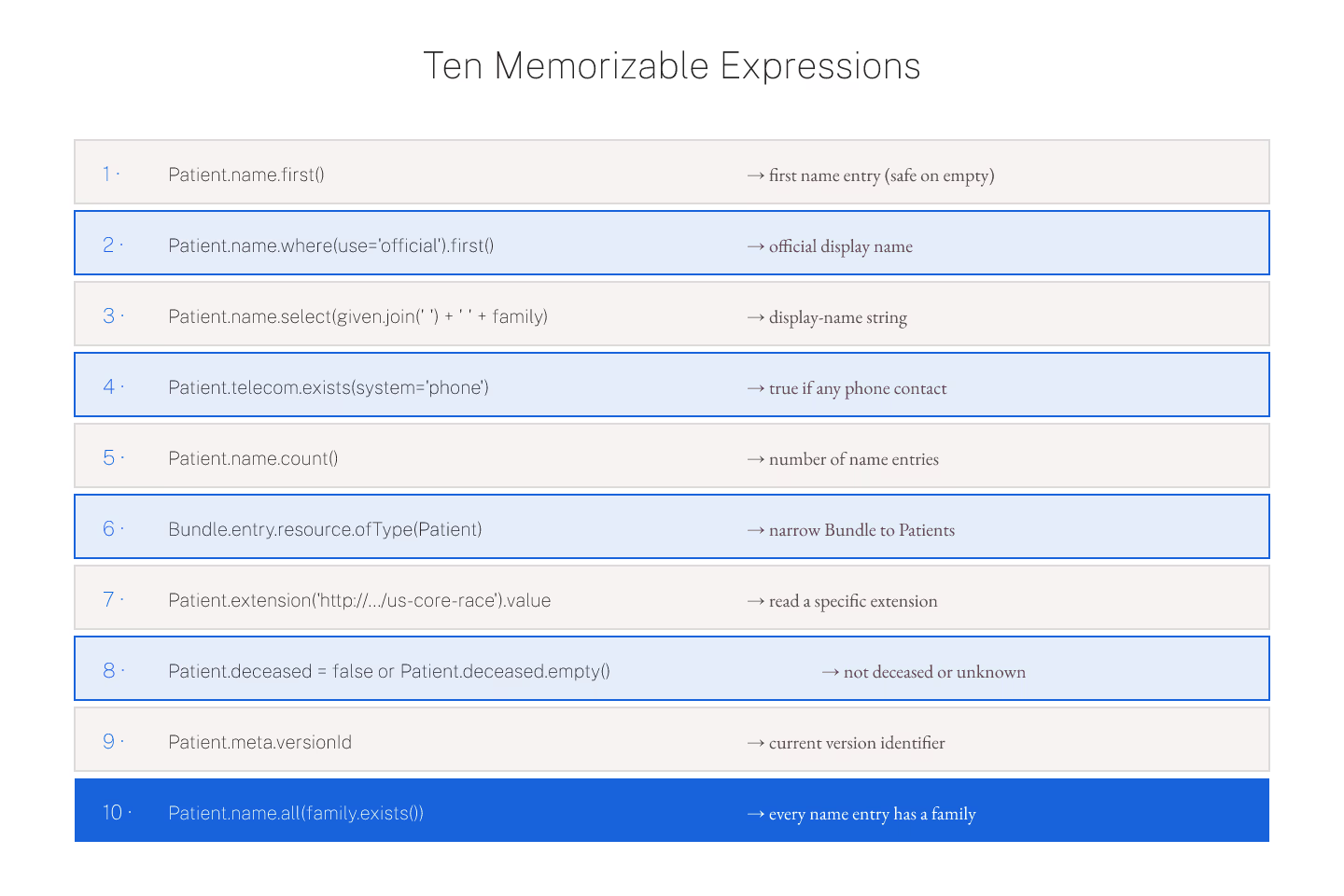
Patient.name.first() returns a single-item collection with the first name. .first() is safe against empty — it returns empty for empty input. Compare with .single() which throws when there is more than one.
Use .first() when you know there is often one but sometimes many. Use .single() when you want the expression to fail loudly if the assumption breaks.
Get the Official Name
Patient.name.where(use = 'official').first() — the pattern that shows up on nearly every UI-facing render. The filter narrows, .first() collapses. If there is no official name entry, the result is empty; the caller renders a fallback.
For the collection semantics behind this, FHIRPath basics for someone who knows JavaScript is the entry.
Concatenate Given and Family
Patient.name.first().given.join(' ') + ' ' + Patient.name.first().family — the display-name concatenation. .join(' ') collapses a collection of strings into one. The + operator concatenates strings. The result is a plain string.
Cleaner in one expression: Patient.name.first().select(given.join(' ') + ' ' + family). The .select() projects each item through the given expression.
Check For Existence
Patient.telecom.exists() returns true if the collection has items. .exists() optionally takes a filter — Patient.telecom.exists(system = 'phone') returns true if there is at least one phone contact.
The inverse is .empty() — true when the collection is empty. Prefer .empty() over .exists().not() for readability.
Count Items
Patient.name.count() returns the count. Patient.name.given.count() counts all given names across all name entries — usually different from the name count.
Patient.name.count() = 1 and Patient.name.exists() and Patient.name.count() = 1 are equivalent. Prefer the shorter form.
Extract Values by Type
Bundle.entry.resource.ofType(Patient) narrows a Bundle entry list to Patients only. .ofType() filters by resource type. Chain more property accesses after it: Bundle.entry.resource.ofType(Observation).code.coding.code returns all code values on all Observation entries.
Read an Extension by URL
Patient.extension.where(url = 'http://hl7.org/fhir/StructureDefinition/us-core-race').value — the pattern for reading a specific extension. Extensions live in extension[] on any resource, keyed by URL. The .value at the end returns the polymorphic value.
The idiomatic shorthand for this pattern is covered in extension navigation with FHIRPath: the ext(url) shortcut, which reduces the typing significantly.
Boolean Combinators
and, or, and xor are the boolean combinators. Precedence: not binds tightest, then and, then or. Parenthesize when in doubt.
Patient.gender = 'male' or Patient.gender = 'female' — pick one of two genders. Patient.deceased = false or Patient.deceased.empty() — deceased is either explicitly false or absent.
Get the Last Version Meta
Patient.meta.versionId — the current version identifier. Combined with .exists() it becomes a guard: Patient.meta.versionId.exists() implies Patient.meta.lastUpdated.exists().
Where Invariants Live
Every one of these expressions is a valid invariant on a profile. For the pattern of writing safe invariants, using FHIRPath in invariants without shooting yourself in the foot is the entry.
The Short Version
Memorize .first(), .where(), .exists(), .count(), .ofType(). Learn the extension-URL filter idiom. Practice each expression against a paste-in resource in the tryout. Ten expressions, fifteen minutes; enough surface for eighty percent of real-world work.
Sources
- HL7 canonical FHIRPath specification for filter/collection - HL7 canonical FHIRPath specification for filter/collection expressions