FHIR Questionnaires use FHIRPath in two related places: calculated expressions on items, and enable-when logic that shows or hides items based on other answers. The syntax is the same FHIRPath the rest of the ecosystem uses, but the context — the resource under evaluation is the in-progress QuestionnaireResponse, not a stored resource — introduces a small set of new patterns worth learning. The site's FHIRPath live tryout is where the calculations get validated against a sample response. For the wider FHIR framing, the FHIR primer index has more.
What Gets Calculated
Two Questionnaire extensions carry FHIRPath expressions in practice:
questionnaire-calculatedExpression— computes a value from other answersquestionnaire-enableWhenExpression— evaluates whether an item is shown
Both accept a FHIRPath expression. Both are evaluated in the context of the current QuestionnaireResponse, so paths start from %resource or an explicit reference to the response.
The %resource Context
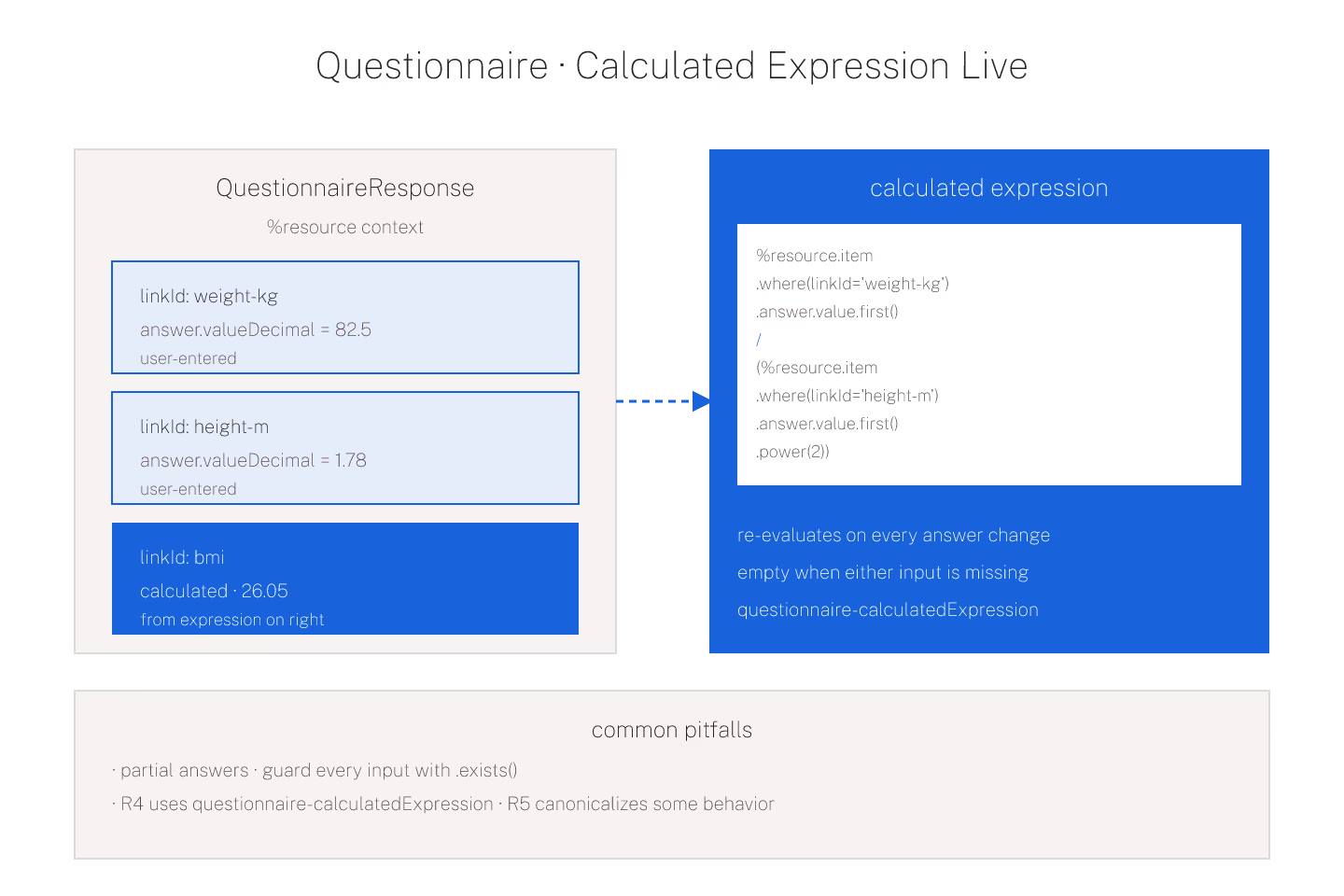
Inside a calculated expression, %resource refers to the QuestionnaireResponse being filled. Item answers are reached via .item.where(linkId = 'someId').answer.value.
The verbose form makes the context explicit; the shortcut form uses %resource.item.where(linkId=...).answer.value and reads similarly. Either is idiomatic. For the base pipeline behavior, FHIRPath basics for someone who knows JavaScript covers the mechanics.
The Common Calculation Patterns
Body mass index from height and weight:
`` %resource.item.where(linkId = 'weight-kg').answer.value.first() / (%resource.item.where(linkId = 'height-m').answer.value.first() * %resource.item.where(linkId = 'height-m').answer.value.first()) ``
Total score from a set of ordinal answers on a scale:
`` %resource.item.where(linkId matches 'q[1-9]').answer.value.sum() ``
.sum() is the sum aggregation. .avg(), .min(), .max(), and .count() are the sibling aggregations. Each collapses a collection to a scalar.
enableWhen Expressions
questionnaire-enableWhenExpression returns a boolean that decides whether the item is shown. Common patterns:
- Show a follow-up question only if the parent answer is "yes"
- Show a total field only when all component fields are answered
- Show a warning item when a computed score exceeds a threshold
The expression evaluates in the same %resource context. Empty results are treated as "do not enable" by most renderers.
The Timing Question
Calculated expressions re-evaluate on every relevant answer change. If the calculation is expensive — traversing a large embedded reference — the UI can feel slow. Keep calculations simple where possible; move complex logic into a server-side operation.
Naming is a small feature: name each intermediate item explicitly so the calculation reads left-to-right without inline arithmetic that outgrows one screen.
The Version Trap
Different FHIR versions handle Questionnaire extensions differently. R4 uses questionnaire-calculatedExpression; R5 canonicalizes some of the same behavior in the base spec. Copying an R4 Questionnaire to R5 without checking the extension URLs is where a lot of "the calculation doesn't fire" incidents come from.
For the invariant safety patterns that apply here too, using FHIRPath in invariants without shooting yourself in the foot covers the ground.
Test Answers That Do Not Exist Yet
Users fill Questionnaires in an order the designer did not fully predict. A calculation that references an answer that has not been given yet returns empty. Downstream expressions have to handle empty gracefully.
The safe pattern: guard every reference with .exists(). %resource.item.where(linkId='weight').answer.value.exists() and ... — the sequence only fires when the value is present.
Where the Expressions Get Debugged
Renderers vary in how they surface calculation failures. Most fail silently — the calculation returns empty and the UI displays nothing. Some emit console warnings. Almost none surface the failed expression to the end user.
That is why the tryout matters. Paste the response shape, paste the expression, watch it evaluate. For the debugging path, typical FHIRPath expressions worth memorizing helps navigate the shapes.
The Short Version
Questionnaire calculations run FHIRPath against the in-progress response. %resource is the context anchor. Empty results are common on partial data — guard with .exists(). Watch version differences on R4 vs R5. Test in the tryout before shipping.
Sources
- HL7 canonical SDC Expressions chapter defining - HL7 canonical SDC Expressions chapter defining calculatedExpression